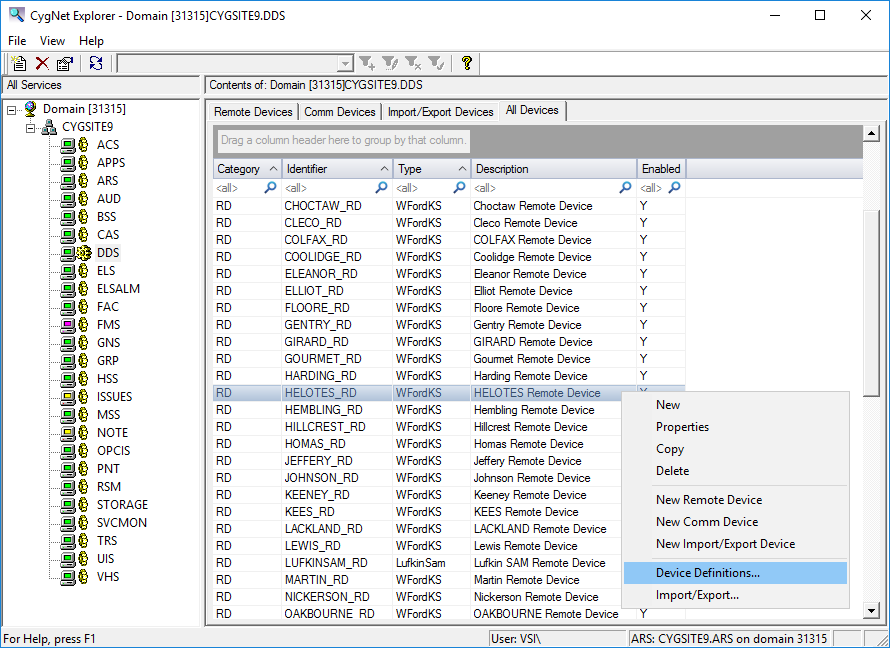
The Device Definition Service (DDS) stores remote device, communication device, and text import records. The DDS and UIS have a one-to-one relationship. As such, to add another instance of a DDS requires that you add another UIS. The services’ relationship is defined in each service’s configuration file.
Click the following image to see an example Device Definition Service:
The following table lists and describes the context menu options that display when you right-click in the DDS service pane.
| Option | Description |
|---|---|
|
New |
Select to configure a partially configured (shallow) copy of the existing device. |
|
Properties |
Select to view the properties of the selected device. |
|
Copy |
Select to copy the selected device. See Copying a Remote Device. |
|
Delete |
|
|
New Remote Device |
|
|
New Comm Device |
|
|
New Import/Export Device |
|
|
Device Definitions… |
Select to view and manage device definitions and template file operations. See Editing a Device Template File. |
|
Import/Export… |
Select to import and export devices. See Exporting and Importing Devices. |
More:
 DDS Configuration File Keywords
|
|
|

